01
Drop your song
Import an MP3, WAV, OGG or M4A. It's decoded locally in your browser — nothing is ever uploaded.
Free · A Squaresmile app
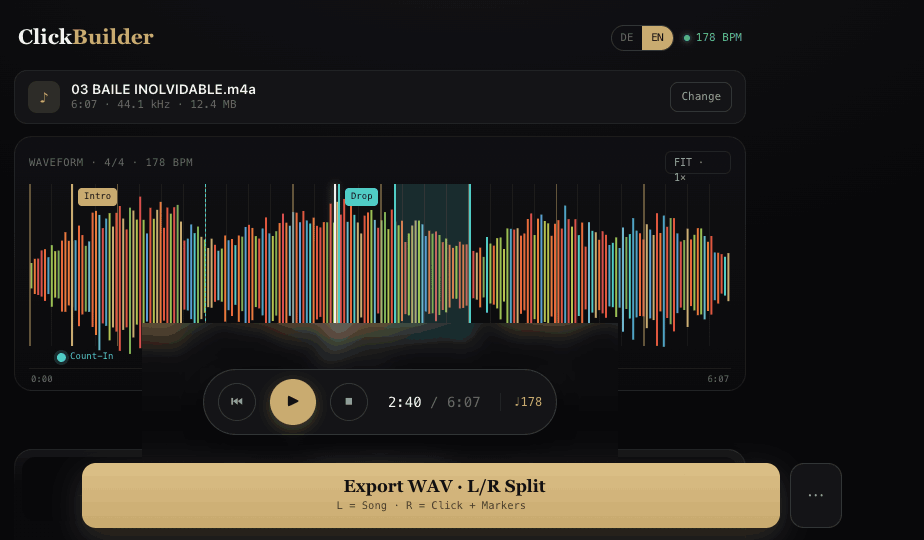
Drop in an MP3, ClickSmith finds the tempo, locks a metronome to the beat, and exports a split L/R WAV — song in one ear, click in the other. No band required.
How it works
No DAW, no plugins, no project files. Everything happens in the page, in real time.
Import an MP3, WAV, OGG or M4A. It's decoded locally in your browser — nothing is ever uploaded.
Auto BPM detection and tap tempo place the beat grid; nudge the offset to the millisecond so beat 1 lands on the downbeat.
Pick a click sound, set per-beat accents, and drop cue markers where you need them.
Render a WAV with the song on the left and click + markers on the right. Straight into your in-ears.
The toolkit
ClickSmith is more than a metronome. Every part of the click is yours to shape — tempo, feel, sound, cues and balance.
Automatic BPM detection and tap tempo lock the grid to your song — then nudge the offset by the millisecond.
Set the time signature and subdivisions, and choose exactly which beats get accented.
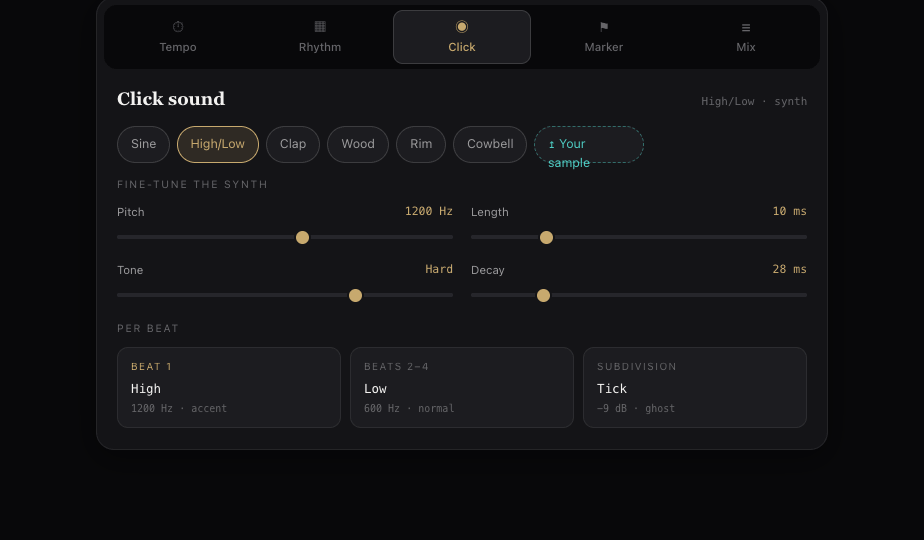
Six built-in sounds — Sine, High/Low, Clap, Wood, Rim, Cowbell — or load your own. Fine-tune pitch, length, tone and decay.
Drop cue markers, attach audio cues, and loop the tricky parts to rehearse them.
Balance the song against the click so the level sits exactly right in your ears.
Features
See the whole song in color with a beat grid, zoom and cue markers — so you always know where you are.
Song on the left, click and markers on the right. Feed the click to your in-ears; the room hears only music.
Sine, High/Low, Clap, Wood, Rim, Cowbell — or upload a custom sample and shape it with the synth.
Drop cue points, loop the hard bars to rehearse them, and attach audio markers that play in the click channel.
No install. Works on desktop or tablet, in English or German, straight from the page.
Runs 100% in your browser. Your audio is processed on your machine and never sent anywhere.
Who it's for
Keep the click in your ear and the song in the room. Stay rock-solid through tempo changes and breakdowns.
Lock the whole band to one grid. Run a click alongside your backing tracks so every part lines up, every night.
Practice any track at its true tempo, loop the hard bars, and build timing that actually transfers to the stage.
Perform to a click without a full band. Cue yourself in, hold the tempo, and sound tight on your own.
One account · Squaresmile
Your free Squaresmile account unlocks a whole bench of browser-based tools for musicians and live-sound engineers — no extra sign-ups, no installs.
Turn any song into a perfectly aligned click track and export it for your in-ears.
Tap along and read any track's tempo in seconds, then carry the BPM straight into your set.
Plan interference-free frequencies for your wireless mics and in-ear systems.
Convert any frequency in Hz to its musical note and cents — handy for tuning and EQ.
Get a read on a room's acoustics before you play, mix or set up the PA.
New browser tools land regularly — all under the same free account.
Explore all appsFAQ
Ready when you are
Create a free Squaresmile account and you're in — no download, nothing uploaded. One login unlocks ClickSmith and every other Squaresmile app.
The Squaresmile suite
Every browser tool below is free the moment you sign up. Create one account and the whole toolbox follows you from gig to gig — no installs, no app store.
Show day
 Show ClockPremium
Stage timer & run-of-show with 3 s crew sync
Show ClockPremium
Stage timer & run-of-show with 3 s crew sync
 Stage Plot GeneratorPremium
Stage plots, input lists & DMX patch in one doc
Stage Plot GeneratorPremium
Stage plots, input lists & DMX patch in one doc
 SetlistForgePremium
Setlists with timing, keys & royalty reports
SetlistForgePremium
Setlists with timing, keys & royalty reports
 RiderSmithPremium
Tech riders in 11 languages, assembled from your tools
RiderSmithPremium
Tech riders in 11 languages, assembled from your tools
Plan the rig
 RF CoordinationFree
Find safe wireless-mic windows for DE / UK / US / EU
RF CoordinationFree
Find safe wireless-mic windows for DE / UK / US / EU
 PowerSenseFree
Loads per phase, cable checks & distro headroom
PowerSenseFree
Loads per phase, cable checks & distro headroom
 RiggingSenseFree
Bridle & truss statics, taught step by step
RiggingSenseFree
Bridle & truss statics, taught step by step
 RoomSenseFree
Acoustic reference: room modes, SPL, LUFS & EQ
RoomSenseFree
Acoustic reference: room modes, SPL, LUFS & EQ
Train your senses
 SoundSensePremium
Ear training on real stems — 21 modules
SoundSensePremium
Ear training on real stems — 21 modules
 PitchSenseFree
Hz ↔ note converter, cents meter & reference tones
PitchSenseFree
Hz ↔ note converter, cents meter & reference tones
Studio & prep
Desktop & plugins



