01
Set the stage
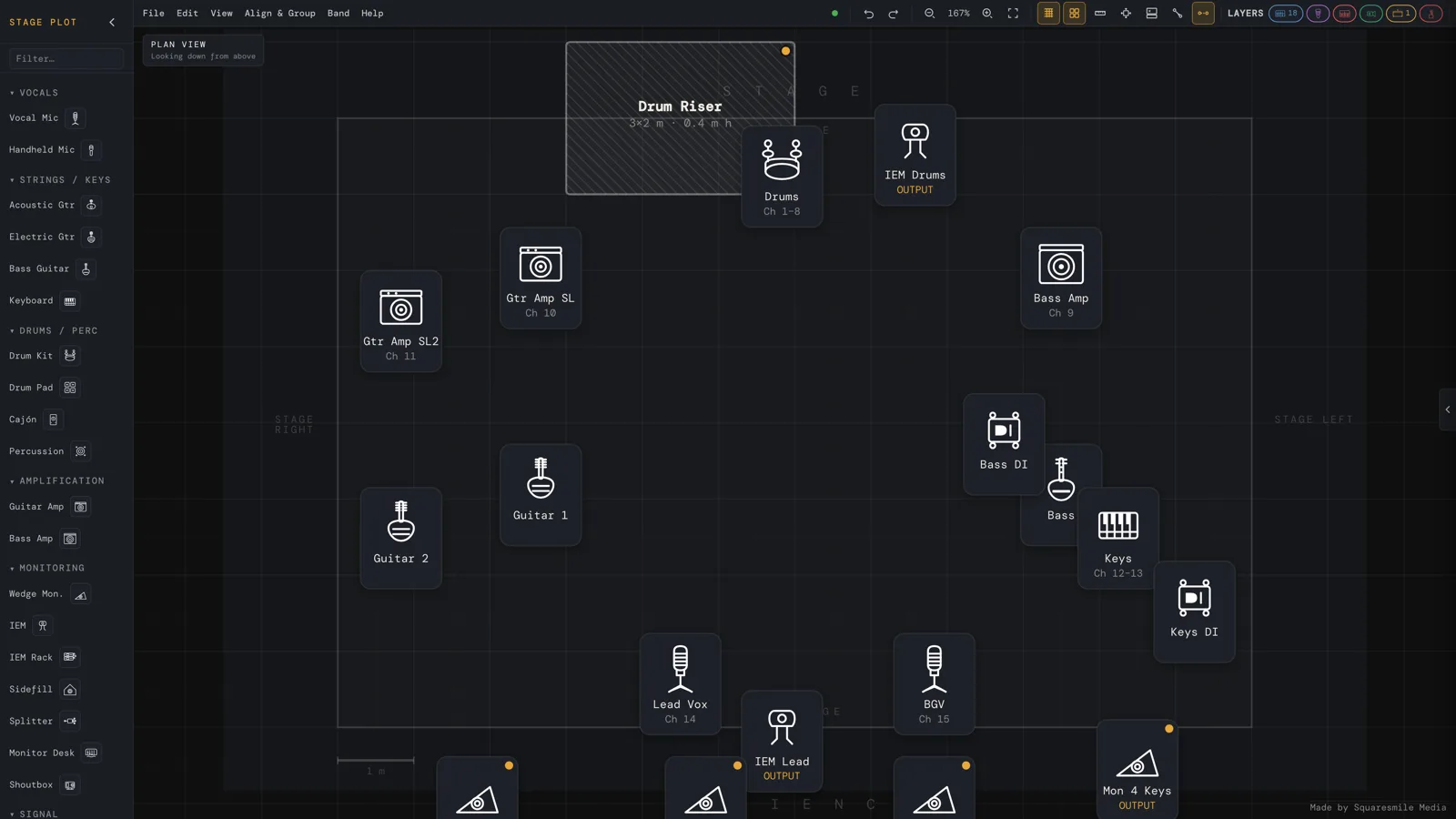
Width, depth and the room envelope in metres — recorded on the document and printed on the PDF, with a scale bar and a measure tool on the canvas.
Premium · A Squaresmile app
A canvas editor with a real element library, a live input list and monitor matrix, DMX universes with conflict checking, a rigging load report, and exports as PDF, PNG, CSV or a share link — view-only for the venue, editable for the crew.
How it works
A picture of a stage tells the venue where things sit. A production document tells them what to patch, what to power, what to hang and who is standing there. This builds the second one — fast enough to do during the advance call.
Width, depth and the room envelope in metres — recorded on the document and printed on the PDF, with a scale bar and a measure tool on the canvas.
Backline, mics, DIs, monitors, risers, fixtures, LED wall, pyro — each with mic model, stand, 48 V, DMX address, power draw and provided-by.
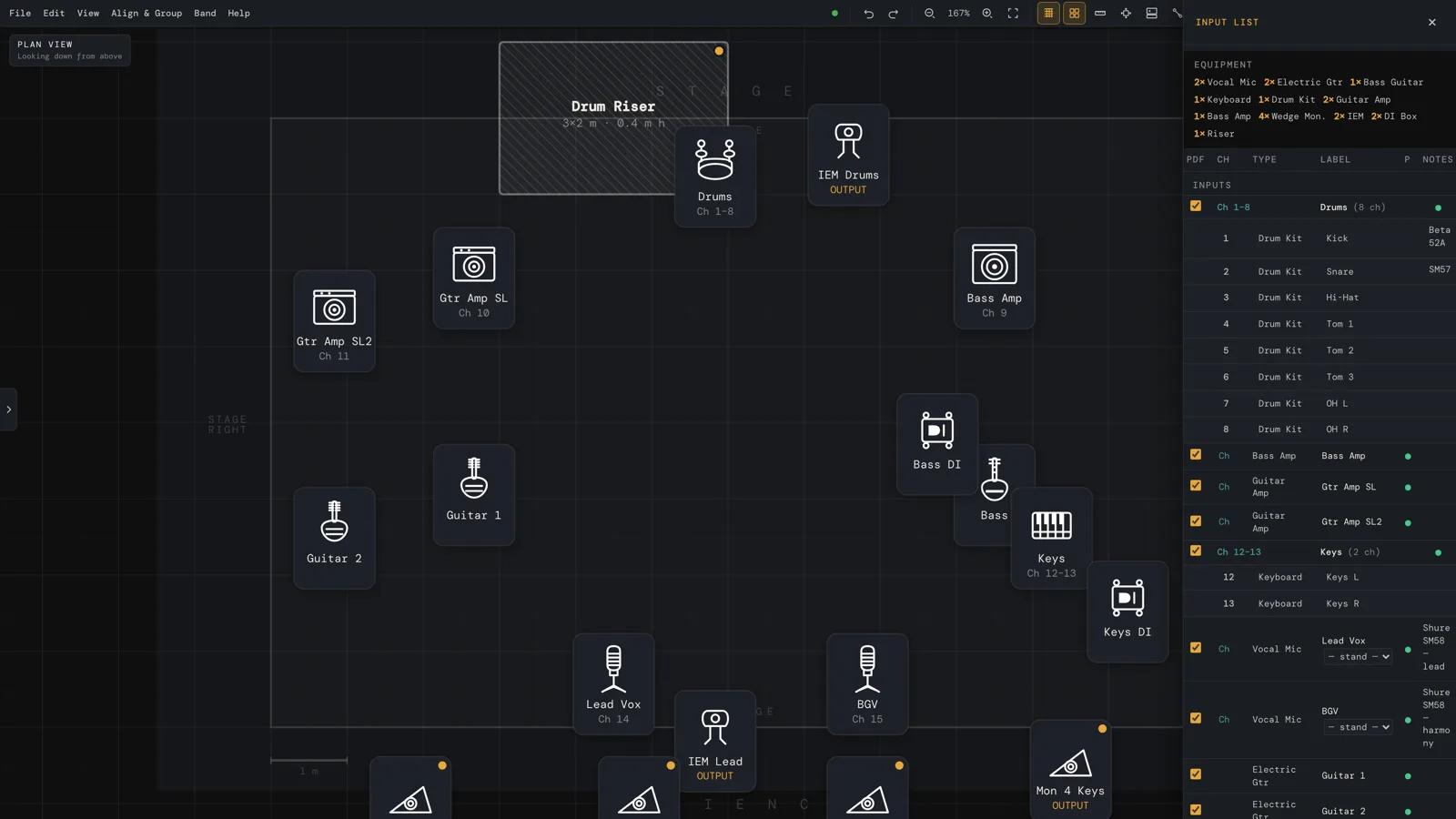
Input list, monitor matrix, DMX universes and personnel stay in sync with the canvas, and DMX conflicts get caught.
PDF for the rider, CSV for the console, or a share link the venue opens without an account.
One document
Everything below lives in the same file as the drawing and updates with it — which is the whole difference between a stage plot and a picture of a stage.
Channel, source, mic, stand, 48 V and notes — exports as a patch-sheet CSV the console can read.
Who hears what, on which mix, on the same page as the plot itself.
Universes, address ranges and channel names, with conflict detection on overlapping addresses.
A summary of what is hanging and what it weighs. Informational — not a certified structural calculation.
Who is on stage and who is on the crew, in the document the venue already has.
Build the club once — stage dimensions, house gear, the usual layout — and reuse it every time you play it.
Plot presets and group templates, so the drum riser you always build takes one click.
PDF for the rider, PNG for the group chat, CSV for the console, .stageplot for the archive, print, or a share link.
A note on honesty: the rigging load report is a planning aid, not a certified structural calculation — treat it the way you would treat any figure you did not have signed off. And the element library is curated rather than an exhaustive vendor database, which is why custom elements and custom fixtures exist.
Inside the app
Features
Grid, scale bar, ruler, measure tool, snap, align and distribute — and the stage dimensions you enter travel with the document into the PDF.
Backline, mics, DI boxes, monitors, risers, lighting fixtures, LED wall, projection and pyro — plus your own custom elements and fixtures.
Channel, source, mic, stand, phantom power and notes — exported as a patch-sheet CSV the console can actually ingest.
Universes, address ranges and channel names, with conflict detection so two fixtures never quietly share an address.
Who hears what, on which mix, on the same page as the plot — instead of in a separate message nobody can find.
Build the club once and reuse it forever. Plot presets and group templates for the rigs you set up every week.
Public, view-only, no account, no licence, nothing to install. The link is the plot you sent — send a new one when it changes.
PDF for the rider, PNG for the group chat, CSV for the console, .stageplot for the archive, or straight to print.
RiderSmith will import this input list into the tech rider, and PatchSmith will build the console patch from the same channel list.
Pricing
Bought once, owned forever. Your licence unlocks Stage Plot Generator on your Squaresmile account, alongside every free tool the platform ships.
Who it's for
One plot per configuration — club, festival, acoustic — sent as a link or a PDF that the house tech can act on without a phone call.
The input list and monitor matrix that the plot implies, exported as a patch sheet before you touch the console.
Fixtures, universes and addresses with conflict checking, plus a load summary of what's going in the air.
FAQ
Yes. The canvas is metre-true: the stage is drawn as a real rectangle at the width and depth you enter, the grid is a one-metre grid, and the ruler and measure tool report real distances. Those numbers travel with the document and print on the PDF.
You choose the convention, and the plot is labelled explicitly — so the person reading it never has to guess which one you meant.
Yes: fixture types, beam angles, DMX universes and addresses, channel counts and conflict checking, plus a custom-fixture editor.
Yes. The public share link needs no account and no licence. It's a snapshot of the plot you sent — when the plot changes, send a fresh link.
No — a plot has one author. Multi-user editing isn't something we do, and we'd rather say so than let you find out mid-advance.
Yes — tablet and laptop. Phones get a device notice: a canvas editor needs the room.
No. One purchase through Gumroad, claimed to your Squaresmile account.
Ready when you are
Create a free Squaresmile account, unlock Stage Plot Generator once, and stop redrawing the same stage in a slide deck.
The Squaresmile suite
Every browser tool below is free the moment you sign up. Create one account and the whole toolbox follows you from gig to gig — no installs, no app store.
Show day
 Show ClockPremium
Stage timer & run-of-show with 3 s crew sync
Show ClockPremium
Stage timer & run-of-show with 3 s crew sync
 SetlistForgePremium
Setlists with timing, keys & royalty reports
SetlistForgePremium
Setlists with timing, keys & royalty reports
 RiderSmithPremium
Tech riders in 11 languages, assembled from your tools
RiderSmithPremium
Tech riders in 11 languages, assembled from your tools
Plan the rig
 RF CoordinationFree
Find safe wireless-mic windows for DE / UK / US / EU
RF CoordinationFree
Find safe wireless-mic windows for DE / UK / US / EU
 PowerSenseFree
Loads per phase, cable checks & distro headroom
PowerSenseFree
Loads per phase, cable checks & distro headroom
 RiggingSenseFree
Bridle & truss statics, taught step by step
RiggingSenseFree
Bridle & truss statics, taught step by step
 RoomSenseFree
Acoustic reference: room modes, SPL, LUFS & EQ
RoomSenseFree
Acoustic reference: room modes, SPL, LUFS & EQ
Train your senses
 SoundSensePremium
Ear training on real stems — 21 modules
SoundSensePremium
Ear training on real stems — 21 modules
 PitchSenseFree
Hz ↔ note converter, cents meter & reference tones
PitchSenseFree
Hz ↔ note converter, cents meter & reference tones
Studio & prep
 ClickSmithFree
Turn any song into an L/R click track (WAV)
ClickSmithFree
Turn any song into an L/R click track (WAV)
 BPM ForgeFree
Tap tempo, metronome, tuner & per-song setlists
BPM ForgeFree
Tap tempo, metronome, tuner & per-song setlists
 TempoSenseFree
Hears the tempo — live BPM, ÷2 / ÷4 / ÷8 layers, delay times & MIDI out
TempoSenseFree
Hears the tempo — live BPM, ÷2 / ÷4 / ÷8 layers, delay times & MIDI out
Desktop & plugins


