01
Start listening
Allow the microphone, or pick your interface in the Input window and feed it a pre-fader aux from the desk. TempoSense asks for the raw signal, no voice processing.
Free · A Squaresmile app
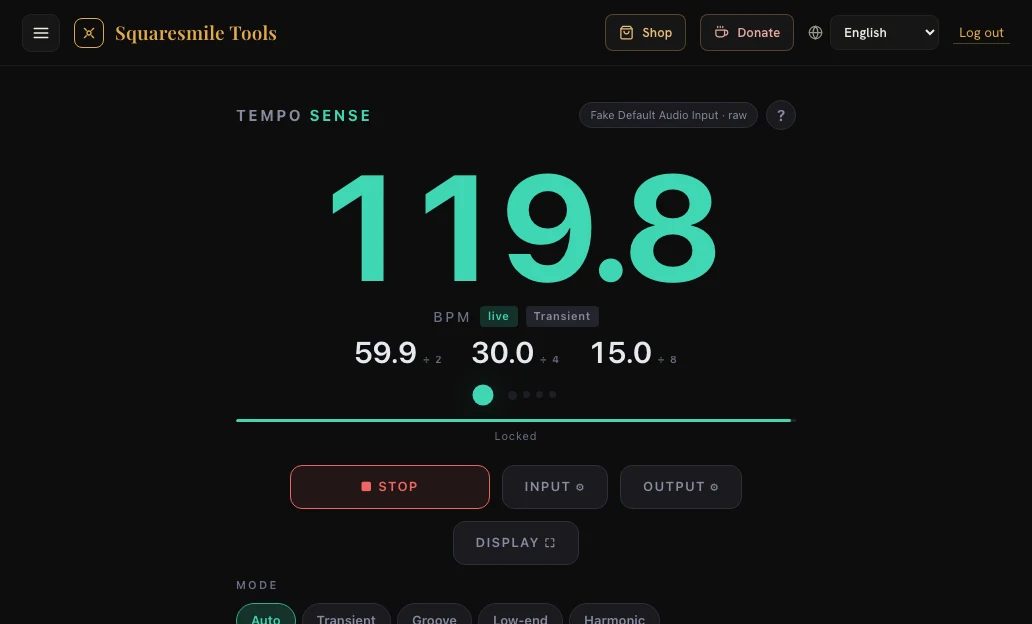
Point it at the band or the DJ — laptop mic, phone, or a line feed from the desk — and TempoSense shows the tempo as one big number, with the delay times and the ÷2 / ÷4 / ÷8 layers already worked out. No tapping, no typing. MIDI out to Ableton, LiveProfessor and lighting desks.
How it works
Allow the microphone, or pick your interface in the Input window and feed it a pre-fader aux from the desk. TempoSense asks for the raw signal, no voice processing.
Four detectors run at once — drums, full mix, low end, chord changes — and the clearest one wins. Pick the range your music lives in and octave errors are gone.
The big number, the ÷2 / ÷4 / ÷8 row, the bar position and the full delay-time table update together. Hold freezes it; ½× / 2× fix the rest.
MIDI to Ableton or LiveProfessor (tempo, delay time), beat pulses to the lighting desk, a set log as CSV, or a fullscreen display for the FOH.
Features
Transient for drums and clicks, Groove for the full mix, Low-end for loud rooms where reverb smears everything but the kick, Harmonic for piano, strings and choir. Auto follows the clearest beat.
Built-in mic, phone, or any interface with channel choice and a live level meter. The browser's echo cancellation and auto gain are switched off, and the tag tells you when a browser ignored that.
÷2 / ÷4 / ÷8 under the number for movers, chases and strobes at different rates; the complete delay table from whole note to triplet, with ÷4 and ÷8 columns.
Tempo and delay time as controller values mapped to your range, beat pulses for ÷1 / ÷2 / ÷4 / ÷8 as notes, MIDI clock if a receiver must slave. Guides for Ableton, LiveProfessor, grandMA and ChamSys built in.
Beat 1 from where the kick and the chord changes land, four bar dots, and a Set 1 button when a heavy backbeat fools it. The ÷4 pulse becomes a real bar pulse.
Record the night: one line per tempo with start, end and duration, exported as CSV. A fullscreen display shows the number and the layers on any monitor.
In the tool
Who it's for
Read the DJ's or the band's tempo and layer the movement: movers on ÷4, a chase on ÷2, strobes on the beat — as notes into the desk's speed masters.
Delay times for the song that is playing right now, or a controller into the delay plugin so it follows the tempo without host sync.
Know the tempo of what is playing before you mix in, count in, or hand the number to BPM Forge for a click at exactly that speed.
FAQ
No. All analysis happens in your browser; no audio leaves the device. Only your settings and, if you switch it on, the set log are stored.
A click every 345 ms is 174 or 87 BPM — no detector can tell. The range pill decides, and ½× / 2× fix the rest in one tap.
Chrome, Edge and Firefox on a laptop. Safari and iOS have no Web MIDI; detection itself works everywhere with a microphone.
Yes — detection, layers, delay table and set log all work on the phone's built-in mic. Use a laptop with an interface for a line feed and for MIDI.
Ready when you are
Create a free Squaresmile account and you're in — one login unlocks TempoSense and every other Squaresmile app.
The Squaresmile suite
Every browser tool below is free the moment you sign up. Create one account and the whole toolbox follows you from gig to gig — no installs, no app store.
Show day
 Show ClockPremium
Stage timer & run-of-show with 3 s crew sync
Show ClockPremium
Stage timer & run-of-show with 3 s crew sync
 Stage Plot GeneratorPremium
Stage plots, input lists & DMX patch in one doc
Stage Plot GeneratorPremium
Stage plots, input lists & DMX patch in one doc
 SetlistForgePremium
Setlists with timing, keys & royalty reports
SetlistForgePremium
Setlists with timing, keys & royalty reports
 RiderSmithPremium
Tech riders in 11 languages, assembled from your tools
RiderSmithPremium
Tech riders in 11 languages, assembled from your tools
Plan the rig
 RF CoordinationFree
Find safe wireless-mic windows for DE / UK / US / EU
RF CoordinationFree
Find safe wireless-mic windows for DE / UK / US / EU
 PowerSenseFree
Loads per phase, cable checks & distro headroom
PowerSenseFree
Loads per phase, cable checks & distro headroom
 RiggingSenseFree
Bridle & truss statics, taught step by step
RiggingSenseFree
Bridle & truss statics, taught step by step
 RoomSenseFree
Acoustic reference: room modes, SPL, LUFS & EQ
RoomSenseFree
Acoustic reference: room modes, SPL, LUFS & EQ
Train your senses
 SoundSensePremium
Ear training on real stems — 21 modules
SoundSensePremium
Ear training on real stems — 21 modules
 PitchSenseFree
Hz ↔ note converter, cents meter & reference tones
PitchSenseFree
Hz ↔ note converter, cents meter & reference tones
Studio & prep
 ClickSmithFree
Turn any song into an L/R click track (WAV)
ClickSmithFree
Turn any song into an L/R click track (WAV)
 BPM ForgeFree
Tap tempo, metronome, tuner & per-song setlists
BPM ForgeFree
Tap tempo, metronome, tuner & per-song setlists
Desktop & plugins


