Visual UHF spectrum
See occupied TV channels, intermod danger zones, cellular blocks, and safe whitespace on one scrollable, zoomable 470–960 MHz spectrum — colour-coded and click-to-pin.
FreqSense is a visual RF frequency-coordination tool for wireless-mic and IEM engineers. See occupied TV channels, intermod danger zones, and safe coordination windows across four regions — overlay a live scan, then print an A4 field document.
What it does
Everything an RF tech needs to coordinate a show — the spectrum, the regulations, the intermod math, and the print-out.
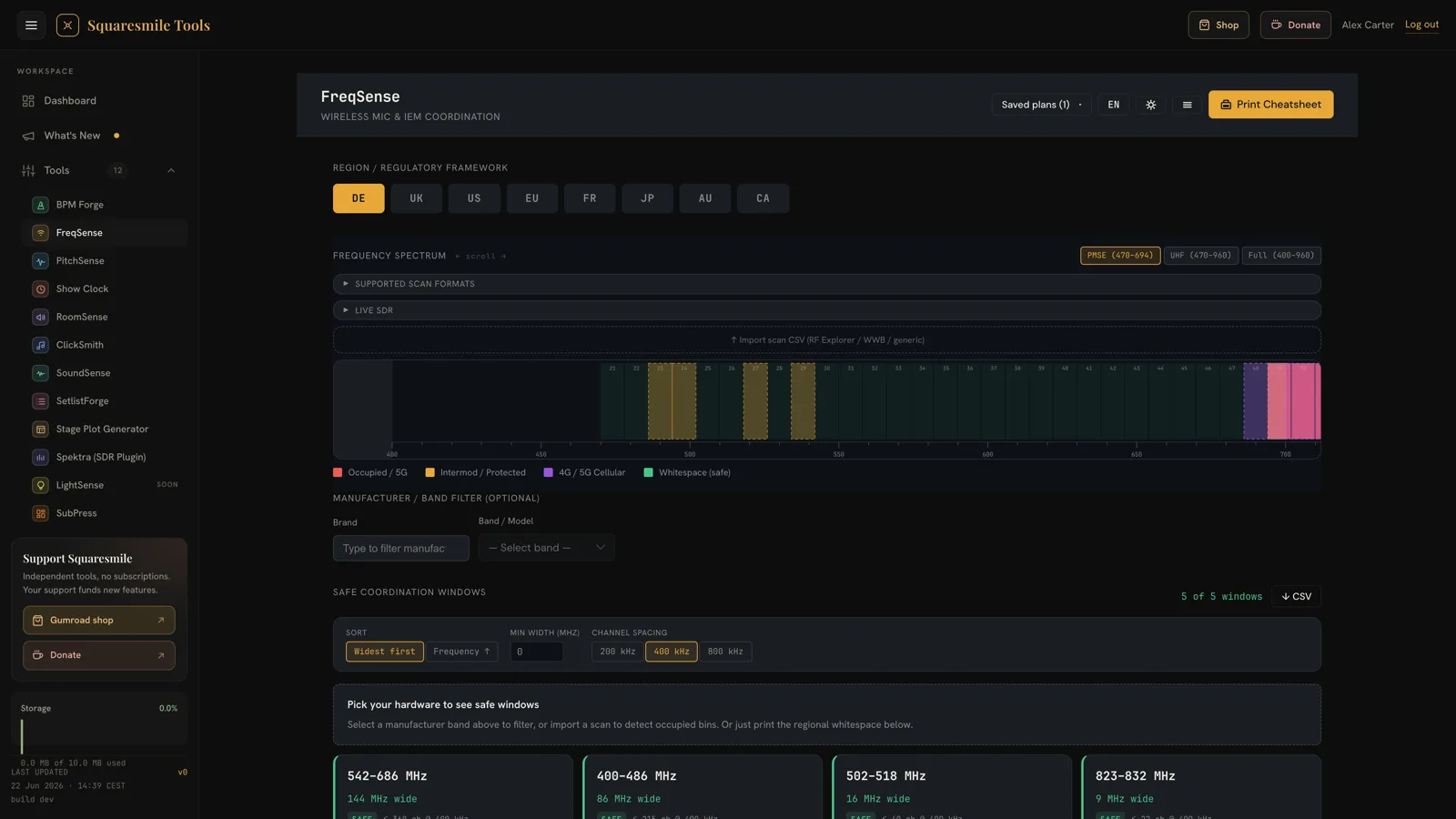
See occupied TV channels, intermod danger zones, cellular blocks, and safe whitespace on one scrollable, zoomable 470–960 MHz spectrum — colour-coded and click-to-pin.
Switch between DE, UK, US and EU regulatory regions (plus FR, JP, AU, CA) and the channel map, guard bands, and licensing rules update instantly.
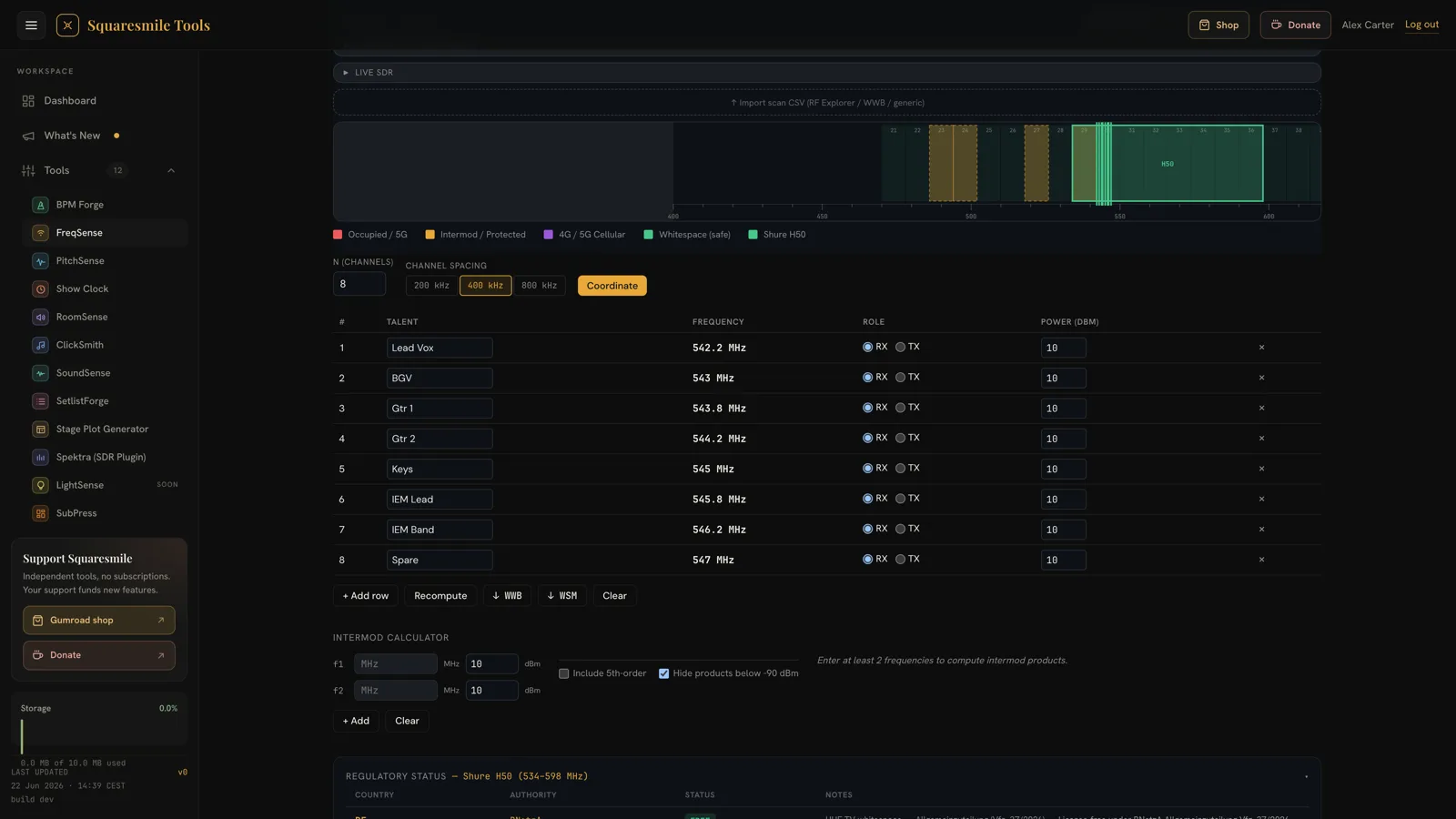
Overlay the tuning range of your actual hardware — Shure, Sennheiser, Sony and more — and pin multiple systems to check them against each other at a glance.
Coordination windows are sorted widest first, with 3rd- and 5th-order intermod products and TX-on-RX hits computed and flagged — not just empty gaps.
Drag a scan CSV from RF Explorer, Shure WWB6/7, R&S FSH or a generic two-column file and the real noise floor overlays the plan. WebUSB SDR too.
Turn the result into a clean A4 field document — spectrum image, window table, and assignments — to tape to the FOH desk. Save plans as JSON for next time.
In the tool
Real screenshots from the tool — the regional map and a coordinated channel plan.
Live RF
.csv / .rfeFreq (Hz), dBµVCenter, LevelMHz, dBmThe regulatory map tells you where TV is supposed to be. A scan tells you what's actually on air in that room. Drop a sweep and the live trace overlays the plan, with a noise-floor threshold you can drag to shrink the windows around real interference.
The workflow
DE, UK, US or EU — the spectrum redraws to that regulatory plan.
Select a manufacturer band, or drop a scan CSV to see the live noise floor.
Safe coordination windows are listed widest-first, intermod already flagged.
Export an A4 cheatsheet for the desk, or save the plan as JSON.
Coverage
Each region carries its own channel map, guard bands, and licensing status — verify against the current database before deployment.
Who uses it
Find clean windows for handhelds and bodypacks between occupied DTT channels, fast.
Coordinate transmitters with intermod and TX-on-RX awareness, not just empty spectrum.
Land in a new city, pick the region, drop a scan, and print a venue-specific cheatsheet.
Check large multi-channel deployments against guard bands and protected services.
Pre-coordinate a package for a client's region and hand over a printed plan with it.
Keep a saved plan for the building and re-verify against a fresh scan each season.
Good to know
FreqSense is a single-page RF frequency-coordination tool for wireless-microphone and IEM engineers. It visualises occupied TV channels, intermod danger zones, and safe coordination windows across DE / UK / US / EU, so you can find clean RF in a venue in under a minute.
The core regions are DE (BNetzA), UK (Ofcom), US (FCC post-repack) and EU (CEPT), with guard bands and licensing status shown per region. The data is informational — always verify against the current regulatory database before deployment.
Yes. Drag a scan CSV onto the spectrum and the live noise floor overlays the plan. Supported formats include RF Explorer, Shure WWB6/WWB7, Rohde & Schwarz FSH, and a generic two-column Frequency, Amplitude file. On Chromium you can also stream a WebUSB SDR live.
The tool finds the whitespace between occupied channels, subtracts guard bands and any scan-flagged ranges, and sorts the results widest first. It also computes 3rd- and 5th-order intermod products and TX-on-RX hits and flags the affected frequencies — so you see the conflicts, not just the empty gaps.
Yes — it's an offline-capable PWA. Load it once and it runs from a venue laptop with no connection, and prints a clean A4 field document of your coordination windows and assignments.
Yes. It's a free tool on Squaresmile Tools — try the live spectrum on this page with no account; the full tool opens with a free account, no install.
Open FreqSense — free, offline-ready, and print-friendly.
Frequency data is informational only. Always verify against the current regulatory database (BNetzA, Ofcom, FCC, CEPT) before deployment.
The Squaresmile suite
Every browser tool below is free the moment you sign up. Create one account and the whole toolbox follows you from gig to gig — no installs, no app store.
Show day
 Show ClockPremium
Stage timer & run-of-show with 3 s crew sync
Show ClockPremium
Stage timer & run-of-show with 3 s crew sync
 Stage Plot GeneratorPremium
Stage plots, input lists & DMX patch in one doc
Stage Plot GeneratorPremium
Stage plots, input lists & DMX patch in one doc
 SetlistForgePremium
Setlists with timing, keys & royalty reports
SetlistForgePremium
Setlists with timing, keys & royalty reports
 RiderSmithPremium
Tech riders in 11 languages, assembled from your tools
RiderSmithPremium
Tech riders in 11 languages, assembled from your tools
Plan the rig
 PowerSenseFree
Loads per phase, cable checks & distro headroom
PowerSenseFree
Loads per phase, cable checks & distro headroom
 RiggingSenseFree
Bridle & truss statics, taught step by step
RiggingSenseFree
Bridle & truss statics, taught step by step
 RoomSenseFree
Acoustic reference: room modes, SPL, LUFS & EQ
RoomSenseFree
Acoustic reference: room modes, SPL, LUFS & EQ
Train your senses
 SoundSensePremium
Ear training on real stems — 21 modules
SoundSensePremium
Ear training on real stems — 21 modules
 PitchSenseFree
Hz ↔ note converter, cents meter & reference tones
PitchSenseFree
Hz ↔ note converter, cents meter & reference tones
Studio & prep
 ClickSmithFree
Turn any song into an L/R click track (WAV)
ClickSmithFree
Turn any song into an L/R click track (WAV)
 BPM ForgeFree
Tap tempo, metronome, tuner & per-song setlists
BPM ForgeFree
Tap tempo, metronome, tuner & per-song setlists
 TempoSenseFree
Hears the tempo — live BPM, ÷2 / ÷4 / ÷8 layers, delay times & MIDI out
TempoSenseFree
Hears the tempo — live BPM, ÷2 / ÷4 / ÷8 layers, delay times & MIDI out
Desktop & plugins


